You saw a screenshot of an outlier multiplier inside YouTube Studio, and your own Studio has no Research tab.
I checked YouTube's own posts from July to September 2026 against creator screenshots, then tested the age effect on one real channel. I have not used the tab myself.
By the end you will know which parts YouTube has confirmed, and what to do this week either way.
Quick answer
- The name "Research tab" has covered three tools: Search Insights (April 2022), Inspiration (June 2024) and a new Research destination YouTube began testing on 16 July 2026.
- A YouTube spokesperson told Tubefilter on 5 August 2026 it is tested with "a small number of users". YouTube has given no country list or date.
- The tab shows other channels' outlier videos, with multipliers from 4x to 132x in one creator's screenshot. YouTube has not published the formula; our outlier score divides a video's views by its channel's usual views.
- Creators report a "Watched by my viewers" filter. In my reading, tools built on public numbers cannot copy it.
- No access? Our free outlier checker divides views by the median (the middle value once sorted) of up to 10 same-format uploads before the video; 5x is an outlier.
Check your own video: paste the link in the free outlier checker. It shows the maths and takes a second.
- The YouTube Research Tab Has Named Three Different Tools
- Only a Small Test Group Has the YouTube Studio Research Tab So Far
- What the Research Tab Outlier Multiplier Compares, and What YouTube Has Not Said
- The Watched by My Viewers Filter Is the Part Public-Data Tools Cannot Copy
- The Research Tab Multiplier Versus Spotter Studio, vidIQ and Our Checker
- Why Video Age Flips a YouTube Outlier Multiplier Ranking
- Conclusion (What I Would Do)
- FAQ: YouTube Studio Research Tab
The YouTube Research Tab Has Named Three Different Tools
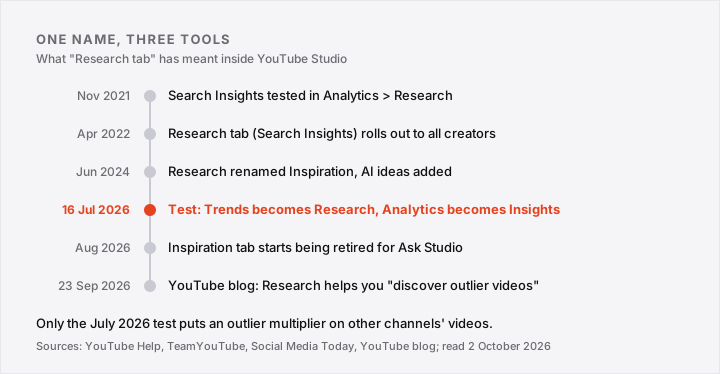
The YouTube Research tab has meant three different tools since 2022, so I would check a tutorial's date before following it.
- April 2022: Search Insights, under Analytics then Research, reached all creators for searches in five countries (Social Media Today).
- June 2024 (reported 4 June): renamed Inspiration, with AI ideas and Breakout videos from similar channels added (Social Media Today).
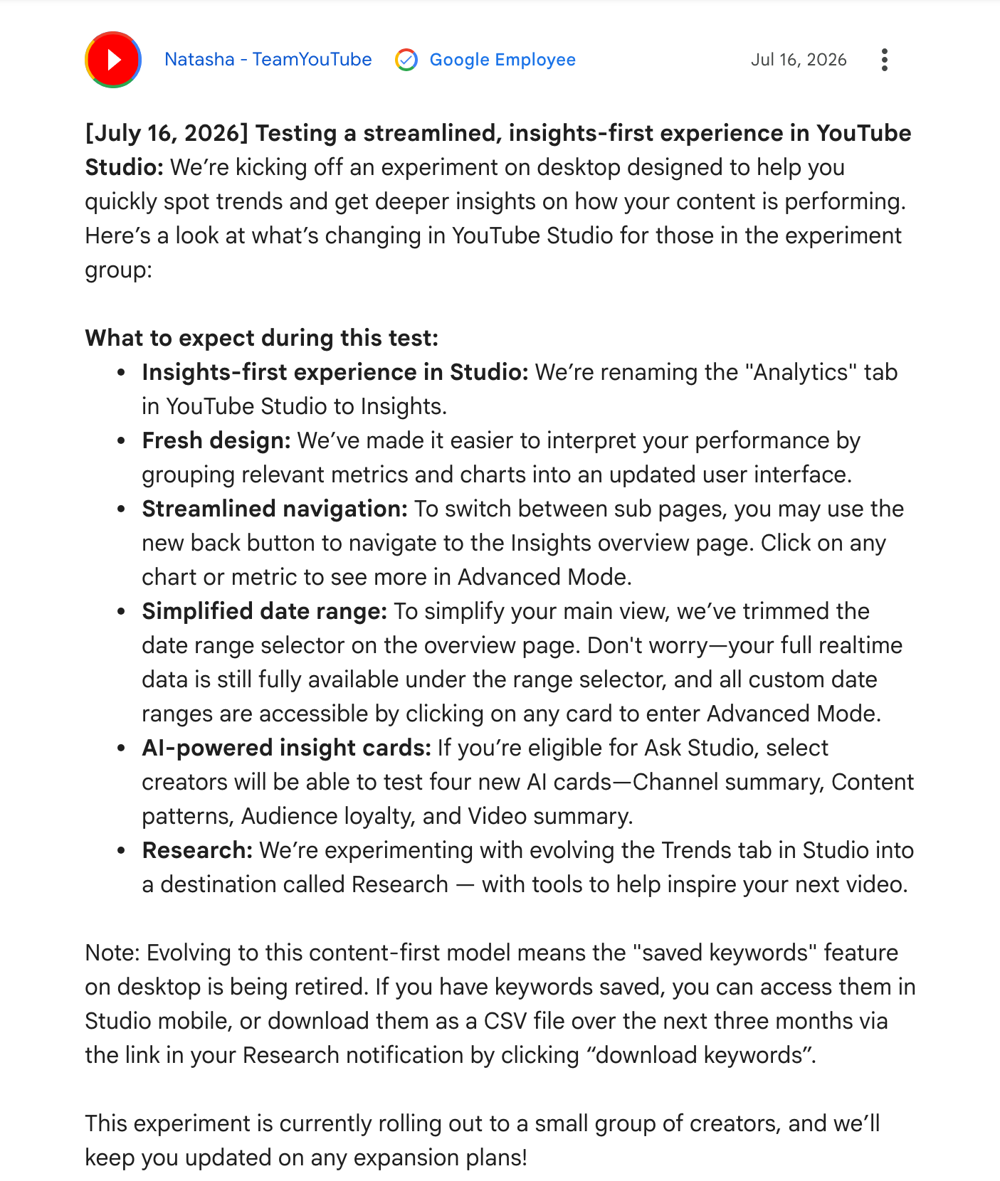
- 16 July 2026: a test renames Analytics to Insights and has the Trends tab "evolving" into Research (TeamYouTube).
- August 2026: Inspiration starts being retired for Ask Studio, YouTube's AI chatbot inside Studio (YouTube Help).
Search Insights' Search Data Now Lives in Trends
Search Insights' search data now lives in Trends: its Help page is titled "Explore trends on YouTube" and lists top searches over 28 days (YouTube Help, read 2 October 2026).
The YouTube Inspiration Tab Is Being Retired, Not Renamed
YouTube Help says "Starting August 2026, we are gradually deprecating the Inspiration tab" (YouTube Help, read 2 October 2026).
So the 2026 Research test grows out of Trends, not Inspiration.
Only a Small Test Group Has the YouTube Studio Research Tab So Far
Only a small group of creators has the YouTube Studio Research tab, on desktop, and as of 2 October 2026 YouTube has given no country list or rollout date.
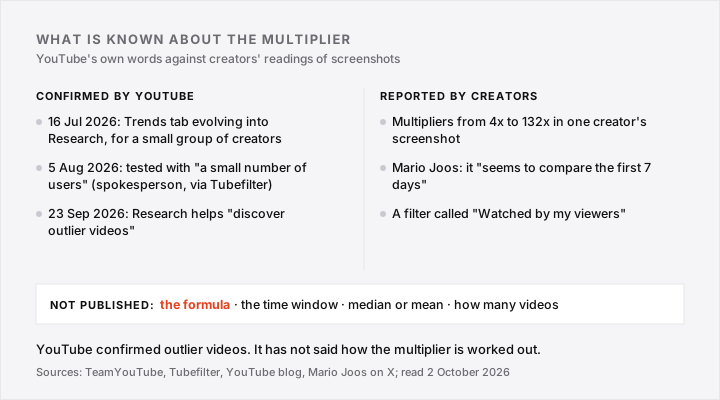
- Confirmed by YouTube, 16 July 2026: "a small group of creators", on desktop (TeamYouTube).
- YouTube spokesperson, 5 August 2026: "a small number of users", no word on wider rollout (Tubefilter).
- Confirmed by YouTube, 23 September 2026: "New Insights and Research destinations", no date or country (YouTube blog).
YouTube Has Given No Country List or Date
Mario Joos, the creator Tubefilter first heard about the tab from, wrote on 16 July 2026 that it did not seem to have reached the global market (Mario Joos).
I would open Analytics on desktop and look for a Research tab where Trends sits, as in Joos' post. If it is missing, stop hunting: I found no setting that switches it on.
What the Research Tab Outlier Multiplier Compares, and What YouTube Has Not Said
YouTube has not defined the Research tab's outlier multiplier. Its 23 September 2026 blog confirms "outlier videos" (YouTube blog) but gives no formula, window or baseline (the usual views compared).
Tubefilter describes it as rating a video against its creator's other content.
What YouTube's Own Posts Leave Out
- The 16 July 2026 TeamYouTube post mentions no outlier, multiplier or "Watched by my viewers" filter (TeamYouTube).
- PPC Land says the 25 September 2026 Creator Insider demo defines no outlier or window; I could not read its transcript (PPC Land).
What Creators Report From the Screenshots
- Mario Joos, 16 July 2026: it "seems to compare the first 7 days of performance" (post).
- NetInfluencer wrote that it "appears to" use the first seven days (NetInfluencer).
One creator's reading of a screenshot is not a formula, so I treat the 7-day window as unconfirmed.
The Watched by My Viewers Filter Is the Part Public-Data Tools Cannot Copy
"Watched by my viewers" is a Research tab filter that creators say shows what your audience watched (NetInfluencer). YouTube's video description promises you can "see what your viewers are watching" (Creator Insider).
- Public-data tools, our checker included, read only public view counts and upload dates.
- Which viewers watched which video is private to YouTube.
- So a tool built on public numbers cannot filter by your audience. That is my reading, not a YouTube statement.
- But YouTube shares a slice: Analytics, then Audience, then "What your audience watches" lists what your viewers watched elsewhere in the past seven days (YouTube Help).
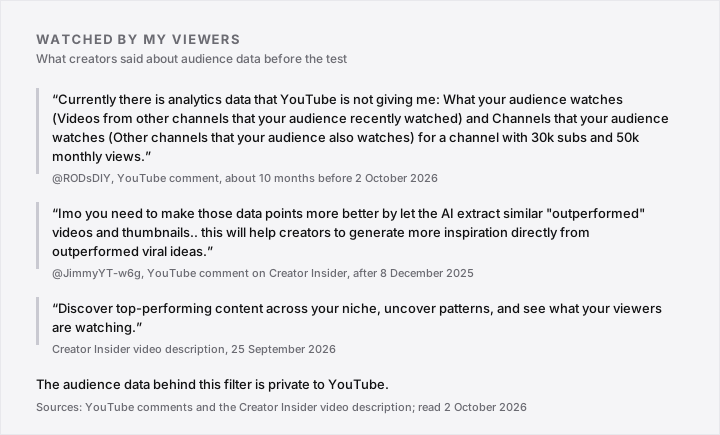
According to the comments, creators wanted audience data before the test existed. One, on a 30k-subscriber channel, said the existing report was not showing for them (comment):
"Currently there is analytics data that YouTube is not giving me: What your audience watches..."
Another asked for "outperformed" videos (comment).
The Filter Has a Blind Spot Too
OutlierKit, a vendor selling a rival tool, calls the filter a "blind spot" because it only mirrors the audience you already have.
It also concedes that "No third-party tool" holds your viewers' private watch history (OutlierKit, 9 September 2026).
Spotter Studio's help page, archived January 2026, also lists "videos your audience also watches" without saying where that data comes from (Spotter's archived page).
The Research Tab Multiplier Versus Spotter Studio, vidIQ and Our Checker
Four tools use four baselines for an outlier multiplier, and only the YouTube Research tab's is unpublished. Spotter Studio and vidIQ publish theirs, and so does our checker (Spotter's from a January 2026 archive).
| Tool | Compared against | Time window | Published? |
|---|---|---|---|
| YouTube Research tab | The creator's other uploads (reported) | First 7 days? (one creator's reading) | No |
| Spotter Studio | Average first-7-day views over six months | First 7 days | Yes, archived help page |
| vidIQ | Average of the channel's other videos | "Similar timeframe" | Yes, help page, bands from under 2x to above 10x |
| Our free checker | Median of up to 10 prior same-format uploads | Lifetime views; under 14 days flagged | Yes, 5x outlier, 10x big |
Median or Average Changes the Verdict
On 2 October 2026, Brandon Meves' iPad video had 313,715 views. Against the median of the ten uploads before it (20,337.5) that is 15.4x; against their mean (55,837.3), only 5.6x.
The median is the middle value once you sort the views, so one viral upload cannot drag it up. The mean is the plain average, which one does.
When two tools disagree on one video, I would check each one's baseline and window first.
Why Video Age Flips a YouTube Outlier Multiplier Ranking
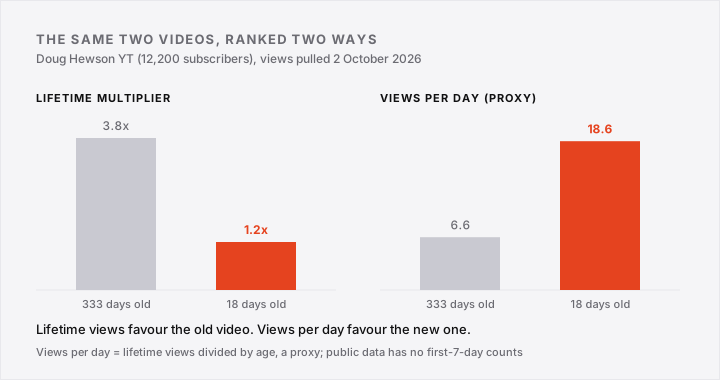
A lifetime outlier multiplier favours old videos, because they have had more days to collect views. On Doug Hewson YT (12,200 subscribers), two videos swap places when ranked by views per day (pulled 2 October 2026).
Doug Hewson's 333-Day Video Versus the Channel's 18-Day Video
- The 333-day-old video: 2,212 views, 3.8x lifetime, 6.6 views per day.
- The 18-day-old video: 334 views, 1.2x lifetime, 18.6 views per day.
The working: 2,212 / 579, the median of the ten uploads before it, is 3.8x. And for the 18-day video, 334 / 276 (its own ten-upload median) is 1.2x.
The 3.8x counts a 184-second upload, just past our checker's 3-minute Shorts limit, as long-form; without it, 3.6x.
Views per day is views divided by age: 2,212 / 333 = 6.6, and 334 / 18 = 18.6. Public data has no first-7-day counts, and views per day favours new videos, so I treat it as a proxy from one channel.
Lifetime Multipliers Keep Climbing
- In our own YouTube outlier breakdown on Toby, 115,963 views on 21 August 2026 was 508.6x the channel's 228 median; 157,241 views by 5 September 2026 was about 690x.
- On Davmanity, "8 Terrifying Facts About Time" read about 70x on 14 September 2026 and about 78x on 20 September 2026, against a 19,810 median.
A fixed early window, if YouTube uses one (reported, not confirmed), would freeze the number. Our checker flags anything under 14 days instead.
Get the next one Every Sunday we send one YouTube outlier breakdown: a channel that just broke out and what changed. Free, one email.
Conclusion (What I Would Do)
I would treat the Research tab as a rough flag, and use it this week only if it already shows in your Studio. If it does not, I would start from the audience report YouTube already gives you.
If You Have the Research Tab
- Search one topic you already cover.
- Switch on "Watched by my viewers", one of the filters creators reported.
- Treat anything under 14 days old as a floor, not a verdict: its multiplier can still climb, so re-check it after day 14.
- Paste the top three into our free outlier checker to see the median-based number next to YouTube's.
If You Do Not Have It Yet
- Open Analytics, then Audience, then "What your audience watches" (not every channel gets it), and note three topics from the past seven days (YouTube Help).
- Use the manual method on three channels in your niche.
- Run each candidate through our checker; 5x is an outlier.
- Re-check any video under 14 days old after day 14 before you drop it.
FAQ: YouTube Studio Research Tab
Where is the YouTube Inspiration tab?
The YouTube Studio Inspiration tab sat under Content, then "Get Inspired", desktop and English only, until YouTube began retiring it in August 2026 (YouTube Help).
Is the YouTube Research tab available on mobile?
YouTube has only described the 2026 test on desktop (TeamYouTube, 16 July 2026). YouTube's 23 September blog says Studio is adding tools "across web and mobile" but does not say Research is one of them (YouTube blog).
What happened to saved keywords in YouTube Studio?
On desktop, saved keywords are being retired. They stay in Studio mobile, or you can download a CSV file over three months via the "download keywords" link in the Research notification (TeamYouTube, 16 July 2026).
Is the YouTube Studio Research tab free?
YouTube has said nothing about a charge. Rival OutlierKit's own comparison lists it as free, next to its own $29, $49 and $199 plans (OutlierKit); our checker is free too.
Does copying outlier videos still work once everyone can see them?
I would copy the topic and the viewer's question, never the title or thumbnail. Tool builder Nick Bencino wrote on 17 July 2026: "Once every creator can see the same metric, the metric stops being an advantage" (post).