What This Checker Actually Measures
A view count on its own means nothing. Half a million views is a disappointment for one channel and the best week of another’s life. The checker divides a video’s views by the median of the uploads before it on the same channel, normally the last ten, or fewer when that is all the channel has.
The median is the middle value once the ten are sorted, and it is used instead of the average because one earlier hit inside the baseline drags an average upwards and makes everything after it look worse than it was.
- Nothing is stored. Each check reads live view counts and forgets them.
- No account, no card, no extension to install.
- Every number it uses is public, so you can verify the result by hand.
What Counts As An Outlier Score
One bar, not two. A video is an outlier from 5x. Ten times or more is simply a bigger one, and those are the ones usually worth taking apart properly.
| Score | What it means |
|---|---|
| Under 5x | Inside that channel’s normal range. Interesting, not unusual. |
| 5x or more | An outlier. The video beat what the channel normally gets. |
| 10x or more | A big outlier. Something specific happened, and it is worth taking apart. |
For where those thresholds come from, and why a raw multiplier alone can be fooled by an unusually quiet baseline, read what a YouTube outlier score is.
How This Differs From vidIQ, ViewStats And 1of10 Outlier Scores
A score from vidIQ, ViewStats or 1of10 can differ because the number underneath the division differs. The uploads included and the kind of average used both change the answer.
I cannot verify the exact current formula for all three, so I would not treat their scores as interchangeable. Our outlier score guide shows how the choice of average changes a real result.
Outlier score = the video’s views ÷ the median views of the same-format uploads before it, normally the last ten.
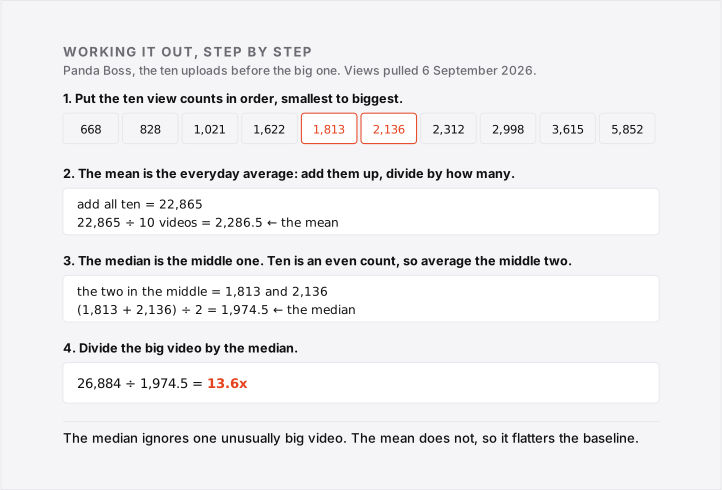
Sort those view counts and take the middle one. With an even number, average the middle two. The checker uses duration to separate Shorts from long-form, and tells you when the baseline is thinner than it would like.
In the guide, Panda Boss’s video had 26,884 views against a median of 1,974.5. So 26,884 ÷ 1,974.5 = 13.6x, rounded to one decimal place. That is a recorded example, not a live count.
When The Number Lies
A multiplier is only as trustworthy as the baseline underneath it, and the checker will tell you when that baseline is too thin.
- On a short baseline, one unusually quiet upload can double the score on its own.
- A channel that changed topic recently has a baseline describing a different audience.
- A very new video has not finished collecting views, so it reads low today and higher next week.
Frequently Asked Questions
What counts as a YouTube outlier?
Five times the channel’s own median or more. That is the whole rule. A video pulling 5x what that channel normally gets is an outlier; 10x or more is a big one. The multiplier is always measured against the channel itself, never against its subscriber count and never against other channels.
Is this checker free?
Yes, with no account and no card. There is a daily cap on how many checks the free YouTube quota allows, and if it runs out the tool says so and comes back the next day.
Is there a free YouTube outlier finder?
Not quite, and the difference matters. A finder searches YouTube and hands you candidates. This is a checker: you bring a link, it tells you how unusual that video was for its own channel. To go looking for candidates by hand instead, the free manual method walks through it.
Does the checker work for Shorts?
Yes. It groups videos of up to three minutes as Shorts and compares them separately. Duration is only an estimate of format, so short horizontal videos can enter that group too. Check the baseline list.
Can I check someone else’s channel?
Yes. Everything it reads is public, which is the point: you can measure a competitor’s video exactly the same way you measure your own.
Why is my number different from vidIQ, ViewStats or 1of10?
Because the number underneath the division differs. Which uploads enter the baseline, and whether a tool uses the median or the average, both change the answer. This checker uses the median of the same-format uploads before the video and prints that list, so you can redo the division by hand. Most tools never show you theirs.