Your Home feed is full of videos you never wanted, or your channel's views fell and a fresh start tempts you. One of those resets is real.
I read YouTube's Help pages on 2 October 2026 and checked them against our own outlier study (not yet published) and four named channels.
You will leave knowing how to reset your feed and what to check on your channel instead.
Quick answer
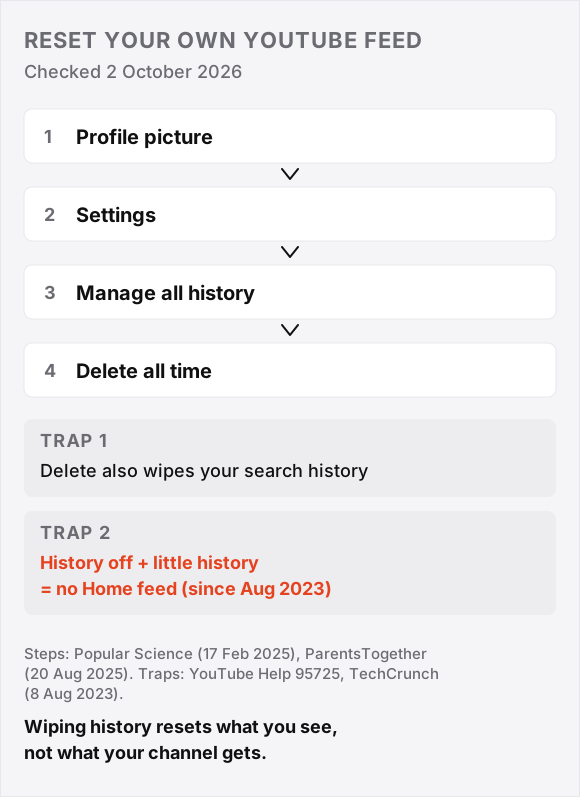
- Your feed resets. Phone: profile picture, Settings, Manage all history, Delete, Delete all time. Desktop: myactivity.google.com, YouTube History.
- The trap. Since August 2023, Home shows no recommendations if history is off and you have little recent history.
- Your channel has no reset. YouTube says the algorithm follows the audience, and found no correlation between break length and views across thousands of channels.
- Deleting videos is not a reset. Todd Beaupre of YouTube said on 23 March 2024 that deleting a video cuts your channel's connection to its audience.
- Normal drifts, it does not zero out. In our own outlier study (not yet published), a channel's median (middle) views stayed between a third lower and half higher than the 20 uploads before, in 63.2% of cases.
Check your own video: paste the link in the free outlier checker. It shows the maths and takes a second.
- How to Reset Your YouTube Feed by Clearing Your History
- Why a YouTube Channel Algorithm Reset Does Not Exist
- What Our Data Shows About a Channel's Normal Views
- Deleting Videos or Taking a Break Will Not Reset the YouTube Algorithm
- Starting a New YouTube Channel Versus Pivoting the One You Have
- What Your Subscribers See When You Try to Reset Your Channel
- Conclusion (What I Would Do)
- FAQ: Resetting The YouTube Algorithm
How to Reset Your YouTube Feed by Clearing Your History
Resetting your YouTube feed means deleting your watch history, the list of videos Home uses to pick what to show next.
Steps on Phone and Desktop
- Phone: tap your profile picture, Settings, then Manage all history. Or on desktop, open myactivity.google.com, YouTube History, then Manage History.
- Choose Delete, then pick Delete all time.
Two Traps Before You Press Delete All Time
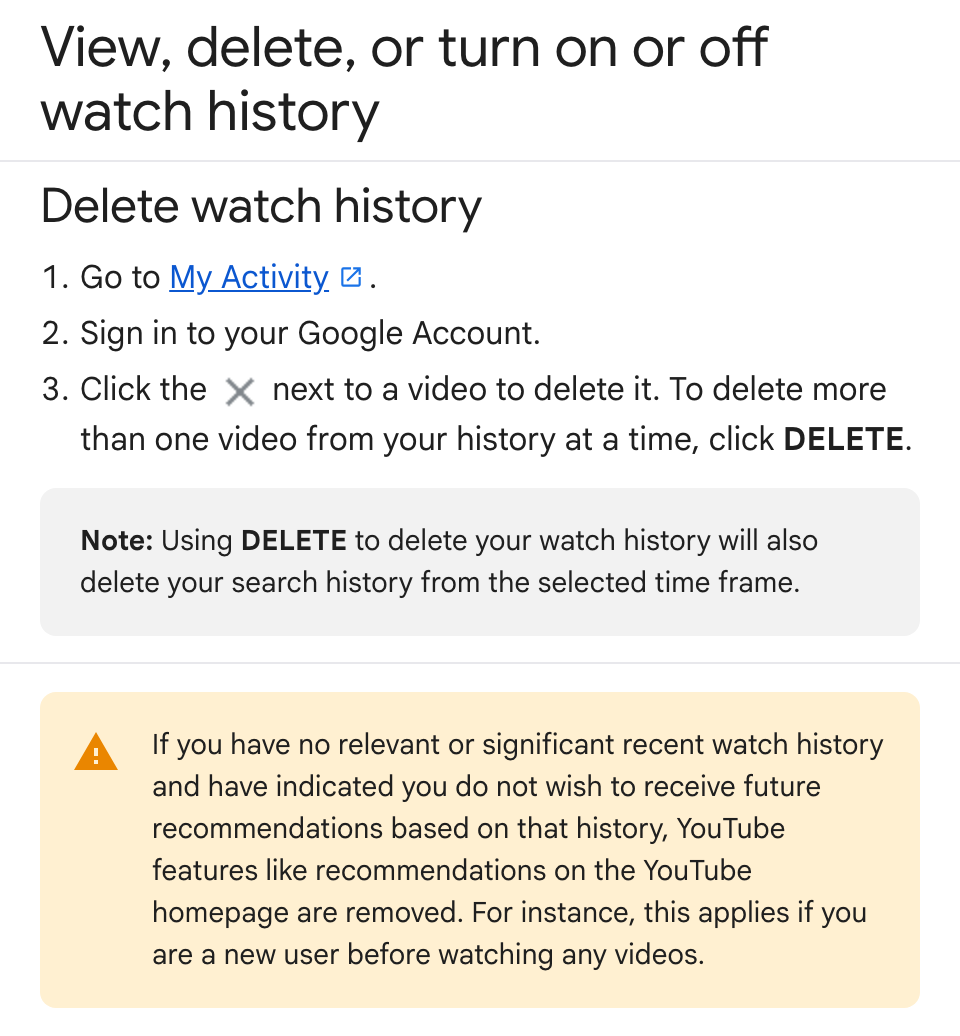
- Search history goes too. Delete wipes it for the same time frame.
- Home can go blank. With history off and little recent history, Home recommendations are removed, a 2023 change users still hit in April 2026.
So I think the safe order is to delete once, leave history on, and watch a few videos on your topic.
Creators: Home relies on watch history, so a clean second Google account shows your niche as a new viewer sees it.
Why a YouTube Channel Algorithm Reset Does Not Exist
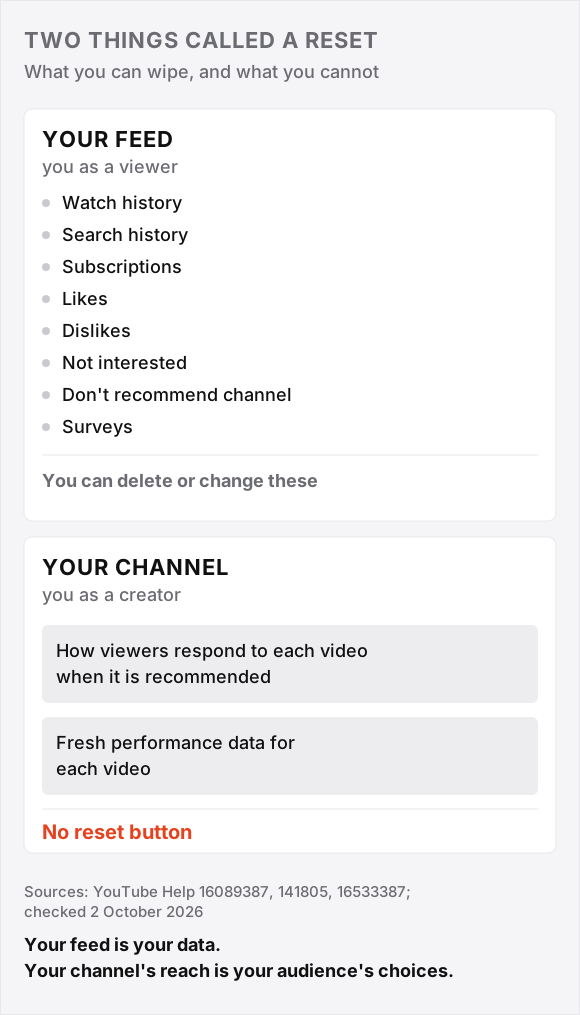
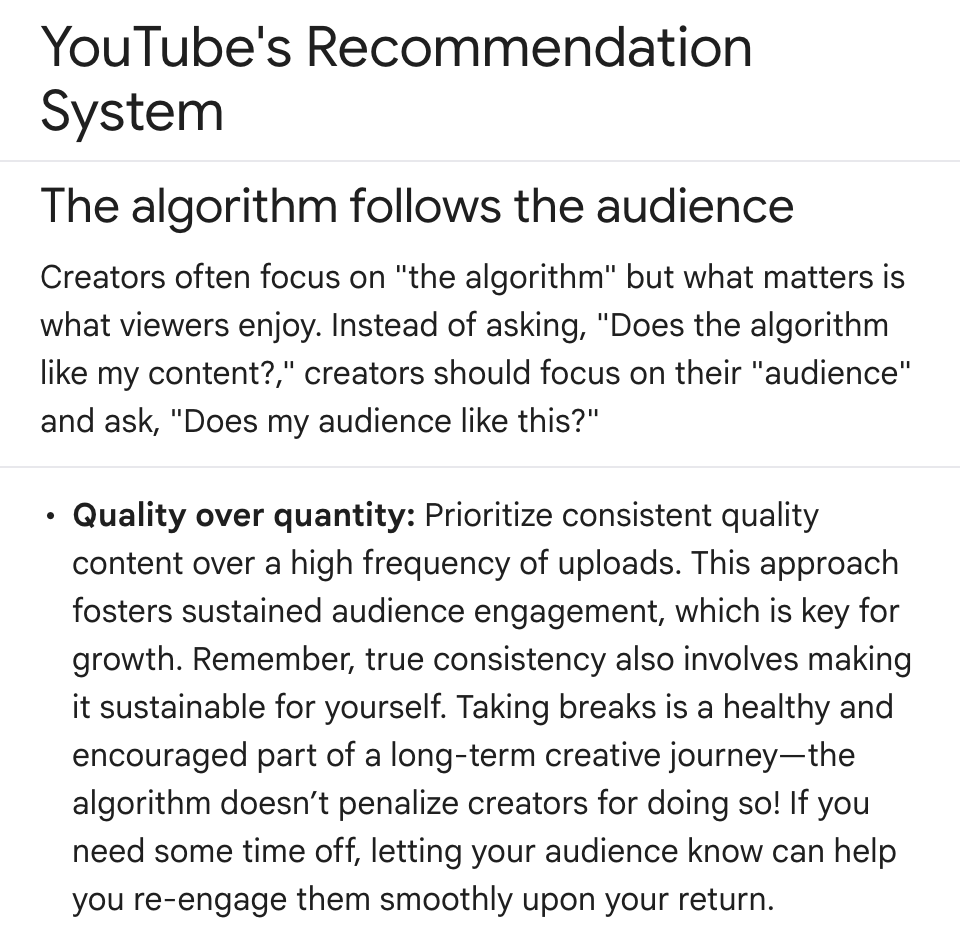
A YouTube channel algorithm reset does not exist, because YouTube's Help page says the algorithm follows the audience.
Also, the system uses fresh performance data for each video, and one video's underperformance does not penalise a channel overall.
YouTube's recommendation page also warns that frequently sharing content that doesn't resonate can, over time, affect overall performance. I read that as an audience problem: views fall when viewers skip most of your videos.
What Our Data Shows About a Channel's Normal Views
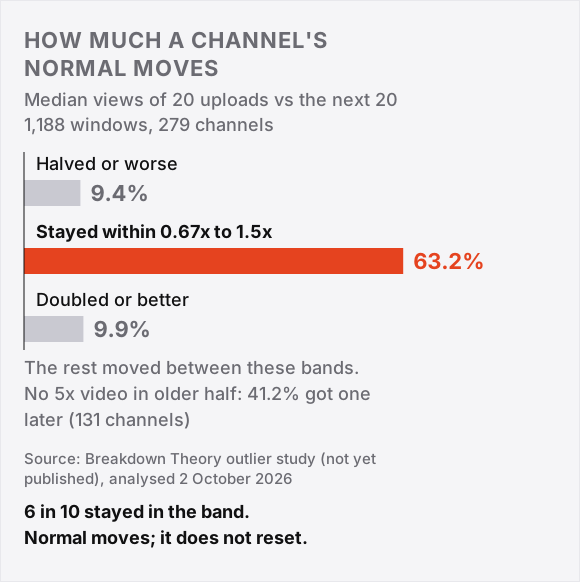
A channel's normal, the median (middle value) of its recent views, stayed between a third lower and half higher than the 20 uploads before in 63.2% of cases, in our own outlier study (not yet published).
We compared the median of each run of 20 uploads with the median of the next 20: 1,188 pairs across 279 channels.
- 63.2% stayed in that band (0.67x to 1.5x of normal).
- 9.9% doubled or better.
- 9.4% halved or worse.
We also split each channel's videos into an older half and a newer half. Of 131 channels with no 5x video (five times normal) in the older half, 41.2% had one in the newer half. So no breakout yet does not mean none to come.
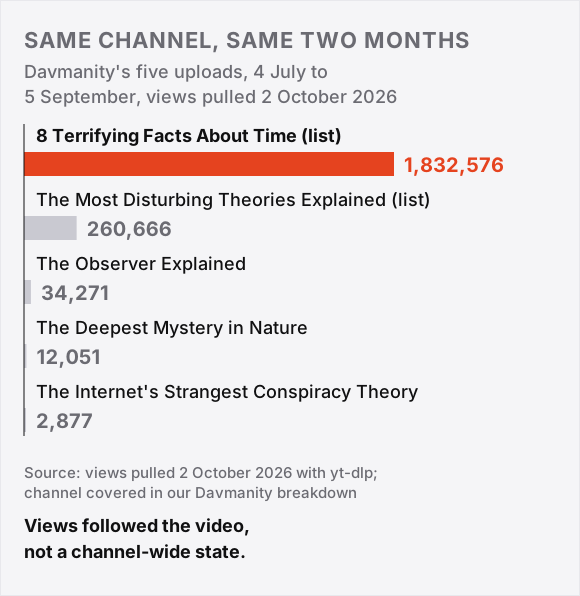
Take Davmanity (joined 9 June 2026), which we covered in our own YouTube outlier breakdown on Davmanity. It posted five uploads from 4 July to 5 September.
One hit 1,832,576 views (pulled 2 October 2026). Leave it out and sort the other four: 2,877, 12,051, 34,271 and 260,666. Their median is halfway between the middle two: (12,051 + 34,271) / 2 = 23,161.
So the hit did about 79 times normal (1,832,576 divided by 23,161), in the same two months as a 2,877-view upload. Views followed each video, not a channel-wide state.
Channel Slumps Are Sticky, Not a Penalty
A slump is three uploads in a row under 0.7x normal (below 70% of normal). The study has 528 slumps on 272 channels; in only 25.0% did the next five uploads get back to normal or better.
After a flop (a video under half of normal), the next upload flopped 30.8% of the time, against 12.3% after an ordinary video. The data has limits:
- It cannot tell a penalty from an audience losing interest.
- Views are lifetime counts, so newer uploads look smaller.
- Study channels were found through search, which favours survivors.
I break down one channel's outlier video every week in the weekly breakdown.
Deleting Videos or Taking a Break Will Not Reset the YouTube Algorithm
Deleting videos or taking a break does not reset the YouTube algorithm. Todd Beaupre says deleting cuts a channel's link to that video's audience; YouTube's own study found no link between break length and views.
Deleting Videos Cuts the Audience Connection
"When you delete a video, you delete your channel's connection to the audience that watched that video," Beaupre wrote on 23 March 2024.
He says to keep videos public or unlist them. So I think unlisting is the safe default.
- One creator who deleted about 200 old videos lost 1,800 of 2,800 watch hours (time viewers spent watching), but also posted his first Short and blames that.
- Another said deleting 10 videos led to months of shadowbanning, while a third never felt it hurt.
Self-reports in both directions show belief, not mechanism.
Breaks Up to 60 Days Left Views 6 to 10% Below Normal
YouTube says breaks are not penalised, but its performance FAQ adds that it may take some time to "warm up" your audience again.
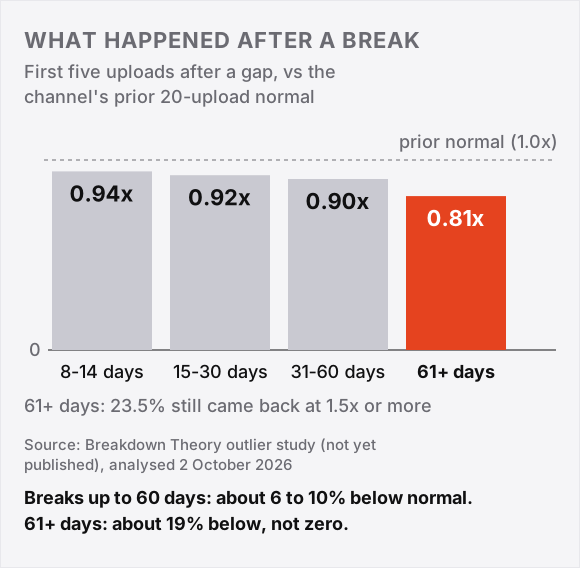
Our own outlier study (not yet published) compared the median of a channel's first five uploads back with its earlier normal:
| Gap | First five uploads vs normal | Came back at 1.5x or more |
|---|---|---|
| 8 to 14 days | 0.94x | 22.1% |
| 15 to 30 days | 0.92x | 26.0% |
| 31 to 60 days | 0.90x | 24.1% |
| 61 days or more | 0.81x | 23.5% |
Read 0.94x as 6% below normal. The last column is the share of comebacks that beat normal by half or more.
A 467-day comeback by the psych diaries (50.6K subscribers) drew 47,775 views by 2 October 2026, about 3.7 times the 12,938 median of her previous 10 long-form uploads.
But after an earlier 236-day break, her comeback video did 0.58x her normal and her next 10 uploads ran at 0.83x. Her longer break came back stronger: 3.7x against 0.58x.
Starting a New YouTube Channel Versus Pivoting the One You Have
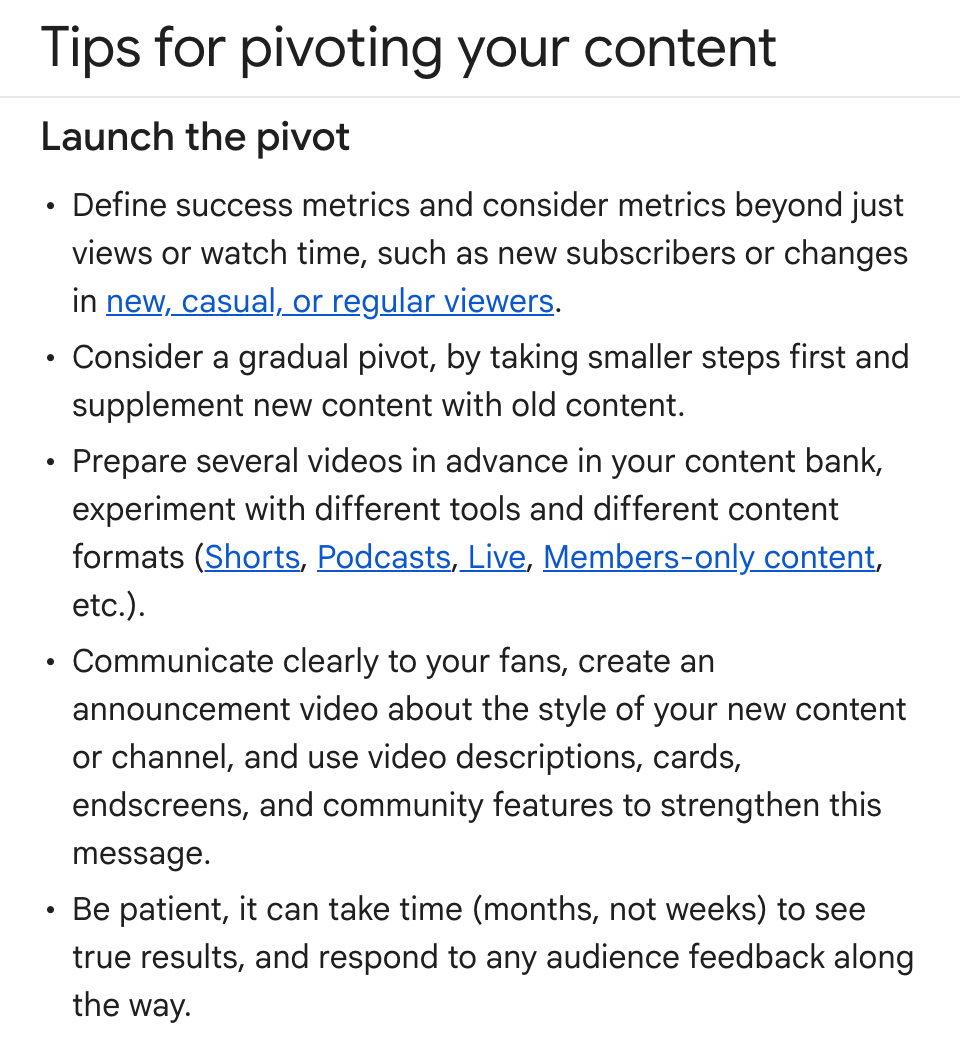
Starting a new YouTube channel or pivoting the old one is the closest thing to a channel reset. YouTube recommends a gradual pivot and says results take months, not weeks.
YouTube's Rene Ritchie said on a February 2026 podcast that a new topic for the same audience belongs on the same channel, and a different audience needs a different channel.
| Case | Move | Median before | Median after |
|---|---|---|---|
| Cathrin Manning, 483K subscribers | Pivot in place, 8 February 2022, after 42 days off | 33,691 | 16,496 |
| Aprilynne Alter | New channel, 14 April 2023, after 281 days off | 4,494 (old channel) | 9,345 (new channel) |
Medians cover 20 uploads each side for Manning and 10 for Alter (lifetime views, pulled 2 October 2026).
So Manning's median fell by about half: 16,496 divided by 33,691 is 0.49, a 51% drop. It stayed down: her uploads 21 to 40 ran at 12,943, and only 8 of her next 110 beat the old median.
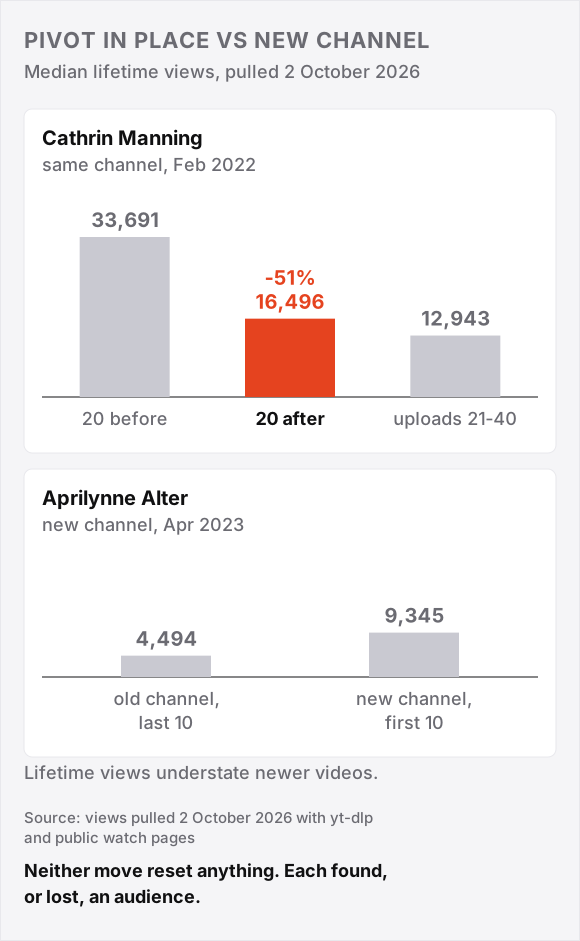
But she calls the switch the best thing she did, a self-report about her goals, not her views. I think a pivot should be judged on what you want from the channel, not on views alone.
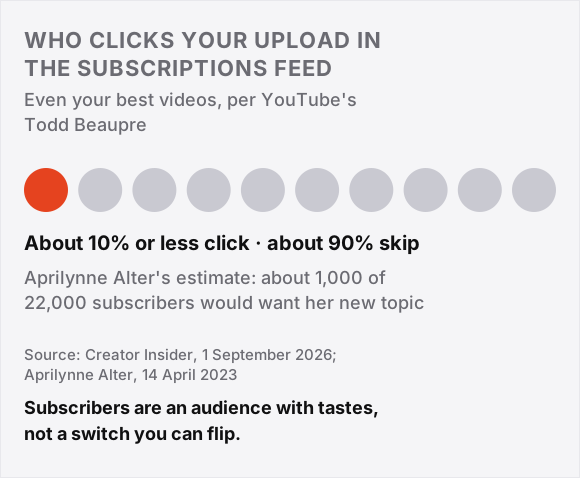
- Alter: she estimated only about 1,000 of her 22,000 subscribers would care about the new topic, Ritchie's different-audience case. Her new channel's first 10 uploads beat the old one's last 10.
- Our data: across 130 format switches (such as tutorial to list) on 53 channels, the next five uploads ran at a median 1.14x the old normal, 14% above it.
- Flops: 30.8% of switches fell under 0.7x normal, against 29.5% of stretches with no switch.
- My read: no sign a format switch is penalised. It does not test a full topic pivot like Manning's.
What Your Subscribers See When You Try to Reset Your Channel
Your subscribers are only one audience for a new upload. Todd Beaupre of YouTube says even your best videos get a click-through rate (CTR, the share of people shown a video who click) of about 10% or less from subscribers.
About 90% of the time subscribers do not watch, which Beaupre calls normal. The system learns separately for subscribers and new viewers.
"If you subscribed to me for car parts and I tell you about icecream, what would you do?" asked one commenter.
I think that is the right test: before a new-direction upload, ask whether your old subscribers would click.
If they would not, expect them to skip it, and judge that video by how new viewers respond. YouTube's pivot page suggests tracking new, casual and regular viewers.
Conclusion (What I Would Do)
My answer on resetting the YouTube algorithm: reset your own feed if it bothers you, and do not try to reset your channel. Run a one-week diagnosis instead.
- Open the Audience tab in YouTube Studio analytics to see which videos grow your audience, as Ritchie advises.
- List your last 10 uploads against your normal. Find topics working in your niche with the free outlier method.
- If your subscribers would watch the new direction, test it gradually on this channel, mixed with what works. If they clearly would not, a second channel is the honest option, as Ritchie says.
- Some creators untick "Publish to subscriptions feed" on test videos (Reddit tip, not YouTube advice).
- Repackage one underperformer with a new title and thumbnail.
FAQ: Resetting The YouTube Algorithm
Can you reset the YouTube algorithm without deleting your history?
Yes, partly. Use "Not interested" or "Don't recommend channel" on single items, or remove single videos from history.
A 2023 audit of simulated accounts found "Not interested" removed 88% of an unwanted topic's Home recommendations on average, with little effect on video pages.
In the same study's survey of 300 US adults, 44% did not know the button existed.
Why is my YouTube channel suddenly not getting views?
YouTube's performance FAQ lists viewers watching other videos, a few hits that brought viewers who did not return, or a fading topic.
Its watchtime tips add topic, editing or upload changes. Neither page describes a penalty.
How do I break out of the YouTube algorithm?
There is no box to break out of. Rene Ritchie says a new title and thumbnail can aim an old video at a broader audience.
Does YouTube shadowban channels?
Not in the way creators mean, says Rene Ritchie on a February 2026 podcast: when he checks, creators claiming a shadowban still get most traffic from recommendations.
His exceptions are copyright blocks and community-guideline issues such as age gating.