You're growing your own channel, and you can see a video on someone else's channel took off. You just can't say by how much, not without paying for a tool.
So I tested it on one real channel: ten upload counts read straight off its public Videos tab, into a spreadsheet. No login, no extension, no account.
Every view count in this post was read on 10 September 2026. They will all have climbed since, which is the point: the method matters more than the numbers, and you should redo it on the day you need the answer.
By the end, you can score any video you can see, free, in about ten minutes, and know when the number is worth trusting.
Quick answer
- An outlier video is one that beat its own channel's normal views by a multiple, and Brandon Meves' iPad video did 268,364 against a 20,310 median baseline, the median being the middle number once you sort them and the baseline being what that channel normally gets, which is 13.2x.
- Use the median of the ten uploads before it, not the average, or the same video reads only 5.0x.
- Leave out every Short and anything under 14 days old, since our own code refuses to pick a video that young.
- Public pages round. The grid and the collapsed watch page both show 268K; expand the description and it becomes 268,364.
- No tool is free forever: vidIQ locks its Advanced Filters to paid plans, and OutlierKit's free trial caps out at 10 credits.
- Every Number You Need Is Already on a Public YouTube Page
- Shorts and Anything Under Fourteen Days Old Come Out First
- Six Spreadsheet Columns Replace the Outlier Tool
- Finding One Outlier by Hand: 268,364 Views Against a 20,310 Baseline
- What a Free Outlier Check Cannot See
- Every Free Guide to This Is Written to Sell You Something
- Conclusion (What I Would Do)
- FAQ: Finding Outlier Videos for Free
Every Number You Need Is Already on a Public YouTube Page
Everything you need sits on two public pages: a channel's Videos tab and each video's watch page.
| What you're reading | How precise it actually is |
|---|---|
| View count | Exact once expanded, rounded elsewhere |
| Upload date | Exact once expanded, relative ("5 months ago") elsewhere |
| Duration | Thumbnail overlay in the grid, full time on the watch page |
| Subscriber count | Never exact anywhere, YouTube rounds it everywhere |
| Likes and comments | Comments exact, likes rounded above a thousand, unless the creator hides them |
The Exact Count Sits Behind the Expanded Description
Open Brandon Meves' Videos tab and on 10 September 2026 the grid showed 268K views on his iPad setup video.
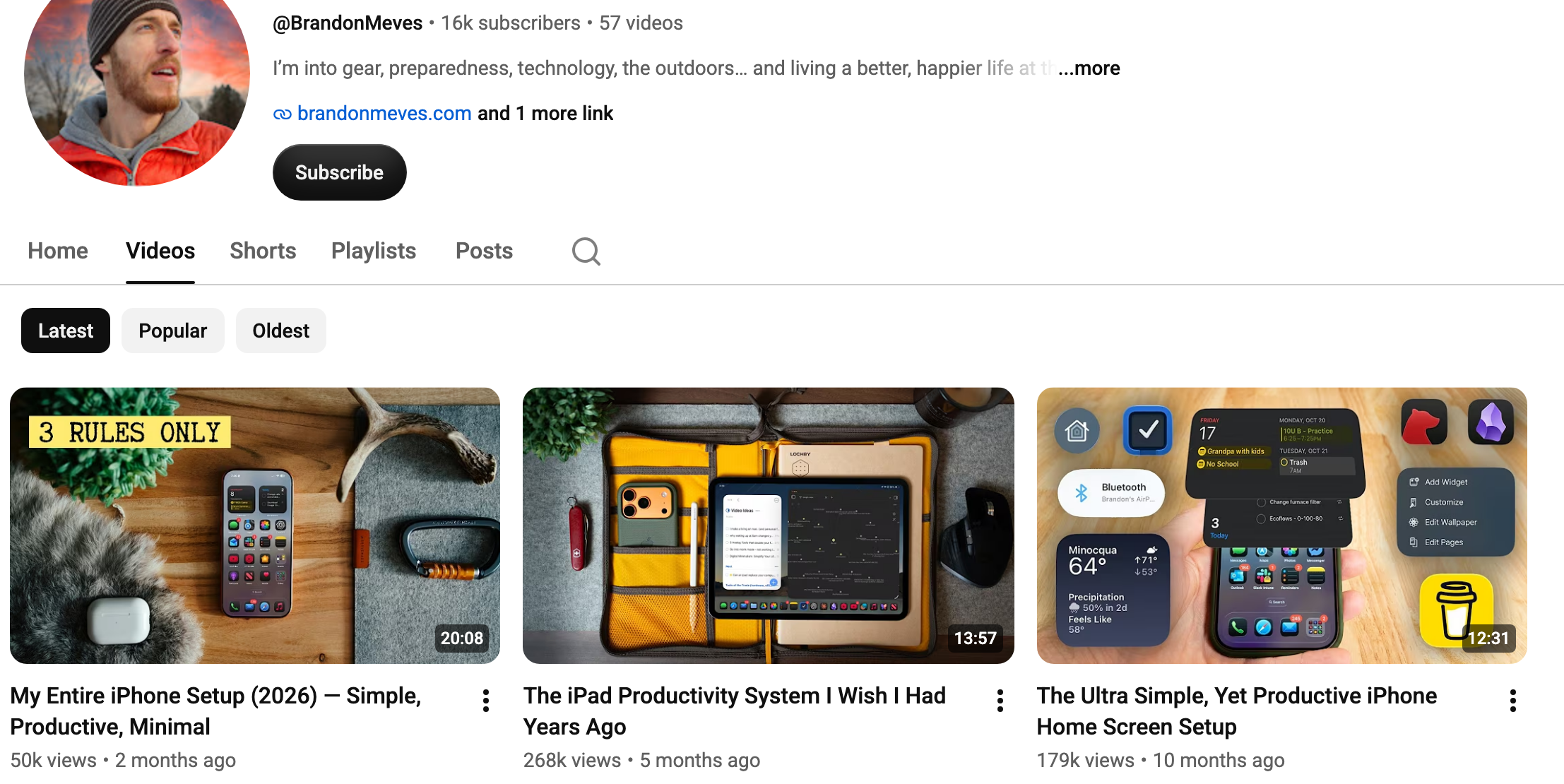
Click through to the video's watch page and on that same date it still showed the rounded 268K until you expanded the description, where the line read the exact 268,364.

So that gap barely matters here, since 268K and 268,364 both read 13.2x. It matters more on a small channel, where a rounded digit can swing the whole median.
What the Grid Hides and What It Won't Let You Compare
- Members-only videos and unlisted videos never show up in the grid at all, so your baseline can be missing rows you cannot see.
- Live streams, premieres, and Shorts on older channels that interleave them do sit in the grid, just not as comparable uploads.
Shorts and Anything Under Fourteen Days Old Come Out First
Three things come out first: videos under 14 days old, Shorts, and anything not sorted by date.
- Under 14 days old: the count is still climbing, and our own code refuses to auto-pick anything that young.
- Anything under two minutes long: our long-form filter drops it, since a Short's views aren't comparable to a full upload's.
- Anything sorted by Popular rather than Latest, which breaks the "ten uploads before this one" premise.
The Fourteen-Day Rule Our Own Code Enforces
The baseline is always the uploads published before the video, never after it.
I wouldn't trust a video's count until it clears 14 days; fresh uploads keep climbing hard that first week.
Our code stays strictly trailing. A baseline that includes later uploads lets the outlier inflate its own comparison set.
For Brandon Meves' channel, the split holds: his Shorts and Videos tabs share no video IDs, checked 10 September 2026.
Six Spreadsheet Columns Replace the Outlier Tool
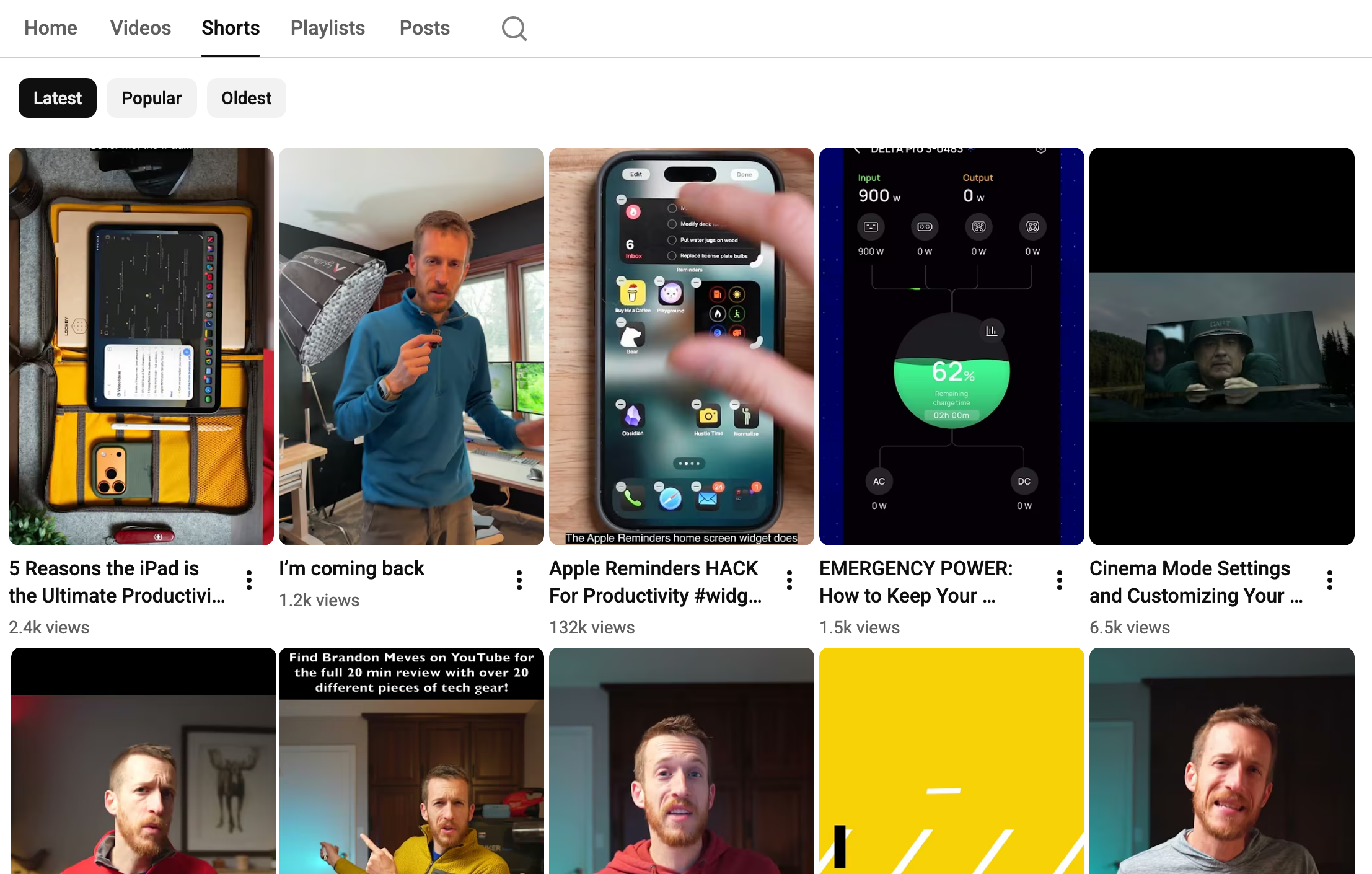
The whole tool is six columns and one division: video, views, upload date, duration, in baseline, and the multiplier.
Open a blank sheet with eleven rows: the video you're scoring, plus the ten uploads before it.
- Video: the title and a link, so you can find it later.
- Views: pulled from the watch page, never the rounded grid number.
- Upload date: the exact date, so you know what counts as before.
- Duration: so Shorts and short clips never sneak into the count.
- In baseline: yes or no, so the scored video never counts itself.
- Multiplier: views divided by the baseline median, filled in last.
I keep the duration column since it catches a stray Short before it wrecks the baseline.
OutlierKit's guide and Tukey AI's guide both publish a manual method. Both record the views, not the sheet itself.
The One Formula the Sheet Needs
Row 2 is the video you're scoring, so its views sit in B2. Rows 3 to 12 hold the ten baseline uploads, so their views fill B3 to B12.
The median of that baseline is =MEDIAN(B3:B12). The multiplier goes in F2: =B2/MEDIAN(B3:B12).
Finding One Outlier by Hand: 268,364 Views Against a 20,310 Baseline
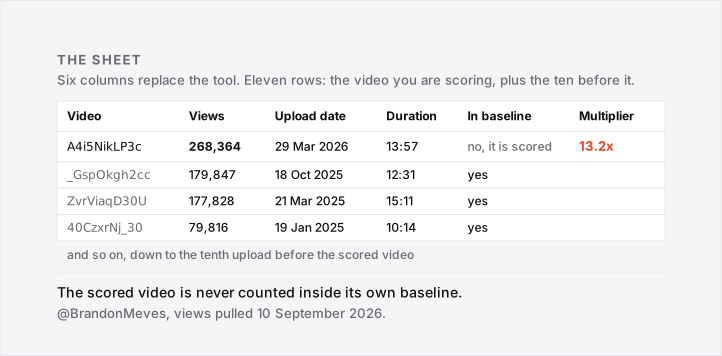
Brandon Meves' iPad video did 268,364 views. The ten uploads published before it have a median of 20,310. Divide the two and you get 13.2x.
Sorting the Ten and Taking the Middle Two
Sort all ten from smallest to largest:
- 963, 1,416, 2,486, 3,284, 4,319, 36,301, 46,337, 79,816, 177,828, 179,847 views.
Ten values is an even count, so the median is the average of the fifth and sixth. Those two are 4,319 and 36,301.
Add those two together and halve the result: (4,319 + 36,301) / 2 = 20,310.
The 4,319-view upload is the 90-minute gift guide, on a channel that otherwise runs 7 to 20 minutes.
Keep it and the median is 20,310: 13.2x. Drop it and nine remain, median 36,301: 7.4x.
Check duration before trusting a median; one odd upload swings it this hard, and that's your call to make knowingly.
The scored video did 268,364 views. Divide that by the 20,310 median: 268,364 / 20,310 = 13.2x.
But the same ten by the average instead of the median give 5.0x, less than half.
Add all ten and divide by ten: 532,597 / 10 = 53,259.7. Divide 268,364 by that: 268,364 / 53,259.7 = 5.0x.
An outlier score is just the video's views divided by that baseline. For why the median beats the average, see our outlier score breakdown.
I wouldn't act on a single 13.2x by itself, I'd want this channel to throw a second outlier first.
Brandon Meves' newest upload did 50,893 views, which is not a standout against this channel's own range. So the second-newest video is the one scored here.
What a Free Outlier Check Cannot See
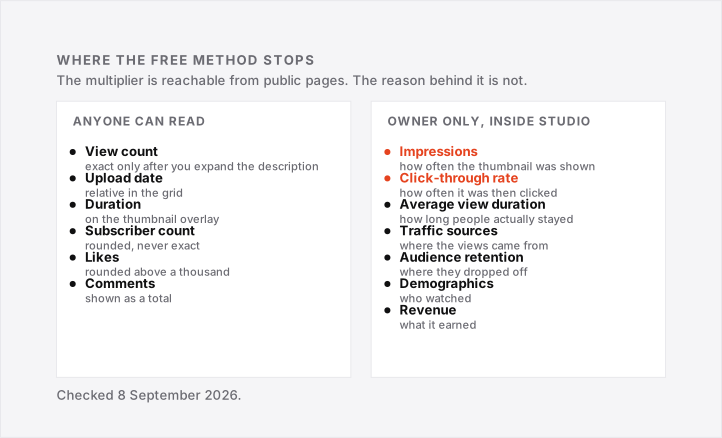
The manual method gets you a defensible multiplier and nothing else. Impressions, click-through rate and watch time, meaning the total minutes people spent watching, all sit inside YouTube Studio, visible only to the channel's owner.
- Impressions: how many times YouTube showed the thumbnail to anyone.
- Click-through rate: how often people who saw it clicked.
- Average view duration: how long viewers kept watching after that.
- Traffic sources: which button, search, or feed sent the viewer there.
- Subscribers gained per video: who that upload actually converted.
"My outlier had one main difference, impressions..."
That's one creator, according to the comments, after checking their own outlier. Another creator's video was flagged, and they still didn't know what made it take off.
Nine Uploads Is Not Enough to Divide By
Moronomy, a 6,000-subscriber channel, has only nine uploads, short of the ten the method wants.
Its newest video did 3,580 views on 10 September 2026. The eight uploads published before it have a median of 557.5, so 3,580 / 557.5 = 6.4x.
Their mean, the ordinary average, is 52,203, because one upload in that eight did 412,837 views. Divide by the mean instead and the same video reads 3,580 / 52,203 = 0.07x.
That blames the baseline's outlier, not the video underperforming.
Our outlier score breakdown covers how much to trust a baseline this thin.
Our code needs four prior uploads for a baseline.
Subscribe for more like this: a new YouTube outlier breakdown lands in your inbox the same day it goes live.
Every Free Guide to This Is Written to Sell You Something
Plenty of pages publish a workable manual method. Every one of them talks it down a paragraph before pitching a product.
- 1of10 calls the method "a full-time job" that "burns time, drains energy," then: "that's why we built a faster way."
- Tukey AI gives six manual steps, then: "I use Tukey AI to close that gap."
- OutlierKit gives the whole method, then: "manual outlier analysis works but takes time."
- A guide titled "Without Expensive Tools" actually runs ChatGPT-written Python on Google Colab against the YouTube Data API.
What They Say Right Before the Pitch
OutlierKit's trial gives 10 credits before you pay, then the meter runs out.
vidIQ's own help doc is blunter: "the Advanced Filters are only available in the vidIQ paid plans. On the free/basic plan, you will be prompted to upgrade to use them."
So that's the pattern: skip every tool and you give up saved filters and some speed at scale.
What you don't give up is the multiplier itself, the spreadsheet gets you that free.
According to the comments, one free outlier tool stopped being free and its outliers feature was removed, leaving only a thumbnail tool behind.
Creators still ask how to grow without money or subscription. A spreadsheet's free tier can't be revoked.
Conclusion (What I Would Do)
Pick one niche channel tonight and copy eleven view counts: the outlier video, plus the ten before it.
I wouldn't trust a multiplier under ten baseline uploads, and I'd drop anything under 14 days old first.
If it holds up, study that topic next, not copy it.
For a good score, our outlier score breakdown covers the thresholds.
FAQ: Finding Outlier Videos for Free
I found an outlier on my own channel, so what do I do with it?
A high multiplier only tells you the topic worked, not why. One creator flagged their own outlier and, per the comments, still couldn't say why.
Start with the packaging: check whether the thumbnail or title changed. Our thumbnail study covers what moves a video afterwards.
How long does the manual check actually take?
About ten minutes: eleven view counts off two tabs, one sort, one division.
Expanding eleven descriptions is the slow part, not the maths, since the grid rounds 268,364 down to 268K.
Will this still work if a tool changes or shuts down?
Yes, because a spreadsheet has no layout to change. One commenter noted vidIQ's Outliers tab looked different from its tutorial video.
According to its own site, the free tool glowAI shut down on 7 September 2026. Your sheet can't do that.
Is this worth doing on a channel with almost no views yet?
Yes, but not your own channel yet, since it won't have a baseline. Score channels you already follow, and start your own upload sheet now so it fills in as you post more.
Does this work for music channels and other odd niches?
Yes, since the division is relative to that channel's own history, not the platform, and works anywhere a channel has ten comparable uploads.
Older catalogue uploads are the catch, since they can behave differently from new ones.
Is studying someone's outlier the same as copying it?
No. According to the comments, one commenter argued at length that copying a tool-flagged outlier redirects earnings from the original video to the copy.
"you ruin the earnings potential of that video..."
A multiplier tells you a topic worked once, not that you should remake the video, and I wouldn't treat it that way.